


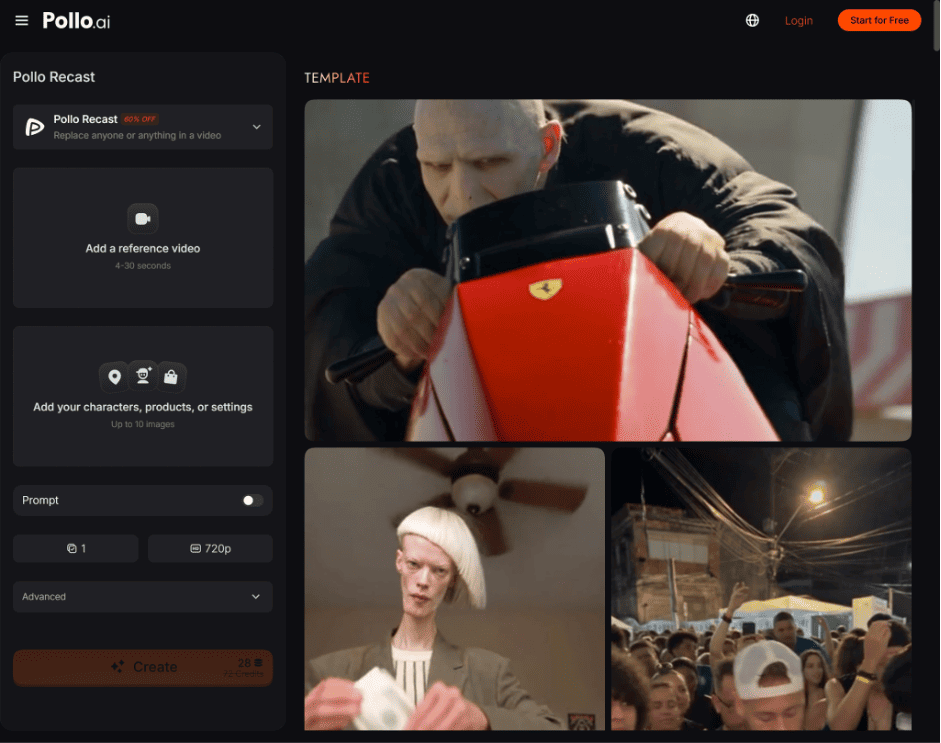
A strong reference video already contains valuable movement, camera work, cuts, and timing, but its original character, product, or setting may not fit your next campaign. With Pollo Recast, Pollo AI lets you reuse the creative structure of that video while rebuilding it around your own character, product, prop, or world.
Table of Contents
What Is Pollo Recast and How Does AI Video Recasting Work?
Pollo Recast turns the motion and camera work of a reference video into a new video featuring different visual elements. The original video guides how the subject moves, how the camera follows the action, and how the scene develops over time.
After generating several recast versions, you can compare the different takes and choose the strongest direction for your campaign. You decide what the new version should feature: a different actor, a new product, another outfit, a branded character, or a completely different visual world.
This workflow is especially useful for e-commerce sellers, brand marketers, creative agencies, and social media teams. An e-commerce team can reuse a strong product reveal for a new SKU, while a brand team can adapt the same movement for a different spokesperson, seasonal campaign, or target audience.
A strong reference video already contains valuable movement, camera work, cuts, and timing, but its original character, product, or setting may not fit your next campaign. With Pollo Recast, Pollo AI lets you reuse the creative structure of that video while rebuilding it around your own character, product, prop, or world.
What Is Pollo Recast and How Does AI Video Recasting Work?
Pollo Recast turns the motion and camera work of a reference video into a new video featuring different visual elements. The original video guides how the subject moves, how the camera follows the action, and how the scene develops over time.
After generating several recast versions, you can compare the different takes and choose the strongest direction for your campaign. You decide what the new version should feature: a different actor, a new product, another outfit, a branded character, or a completely different visual world.
This workflow is especially useful for e-commerce sellers, brand marketers, creative agencies, and social media teams. An e-commerce team can reuse a strong product reveal for a new SKU, while a brand team can adapt the same movement for a different spokesperson, seasonal campaign, or target audience.
For example, a team may start with a creator-style video showing a product being unboxed or demonstrated. Recast can preserve the hand movement, camera push-in, and pacing while introducing another product, outfit, setting, or branded character. This creates a new campaign asset without filming the same action again from scratch.
Once you find a recast version that works, you can use clone video ads to extend the concept into a broader advertising campaign. This makes it easier to develop variations for different products, hooks, markets, or social platforms while keeping the original creative direction recognizable.
The value is not simply replacing one object with another; it is reusing a proven performance and shot concept for a new purpose.
What Can You Replace in a Pollo Recast Reference Video?
Pollo Recast can adapt specific elements or reinterpret the full scene, depending on the creative task. It is useful when the original movement is valuable but the people, products, or setting need to change.
| Creative task | Reference video provides | New version changes |
| Recreate a performance | Character movement, camera work, and pacing | Actor, character, clothing, or visual style |
| Update an advertisement | Proven product demonstration and rhythm | Product, brand elements, or target audience |
| Adapt a social concept | A recognizable action or shot structure | New subject, setting, or campaign message |
| Revise one scene element | Main performance and composition | A selected person, object, outfit, or background |
For example, a seller could reuse a strong product demonstration for another product in the same category. A brand could also ask a new character to perform the movement from an existing social video without rebuilding the action and camera direction from scratch.
How Can Pollo Recast Create More Product and Character Video Variations?
Pollo Recast helps marketing teams create campaign variations from one strong take. Instead of filming the same movement for every product, color, spokesperson, or audience, a team can use the original video as a reference and adapt it to the next brief.
This is particularly useful for:
- E-commerce product variations: Reuse a proven demonstration for another product or SKU.
- UGC ad testing: Adapt a creator-style performance to different products, characters, or hooks.
- Brand character campaigns: Let a recurring character perform different actions across multiple videos.
- Social content adaptation: Turn one effective motion concept into several platform-specific versions.
- Campaign localization: Adjust the product, setting, or visual direction for a different audience.
The direct benefit is a shorter path from one successful concept to multiple usable assets. It can reduce repeated filming and give teams more creative versions to test, although complex actions, fast cuts, heavy occlusion, and small product details may require several generations and manual review.
How Is Pollo Recast Different from Mimic Motion and Video to Video?
Pollo Recast is focused on rebuilding a video around a reference video’s motion and camera structure. It should not be described as the same workflow as Reference to Video, which primarily uses reference images to generate video while maintaining subject consistency.
It also differs from Pollo Mimic and Video to Video. Pollo Mimic makes a still image follow the motion of a reference video, while Video to Video generally transforms an existing video’s style or appearance. Recast is about taking the valuable action and shot design from one video and giving it a new character, product, or world.
How Do You Use Pollo Recast?
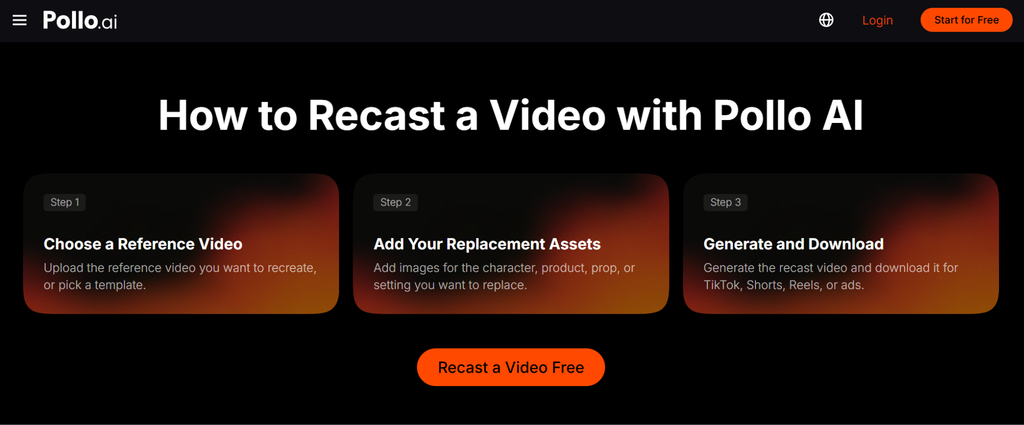
Pollo Recast uses three basic steps: choose a reference video, add replacement assets, and generate the new version.
Step: 1 Choose a Reference Video
Upload a video with clear movement, visible subjects, and camera work worth reusing.
Step: 2 Add Your Replacement Assets
Upload images for the new character, product, prop, clothing, or setting.
Step: 3 Generate and Download
Add a short prompt, generate the recast video, and review the motion, composition, and replacement details.
Start Creating New Video Variations with Pollo Recast
Pollo Recast is most useful when you already have a strong video idea but need to adapt it for another product, character, audience, or campaign. Use one effective reference video as the starting point, preserve the motion and camera language that make it work, and let Pollo AI help you create the next version faster.
For example, a team may start with a creator-style video showing a product being unboxed or demonstrated. Recast can preserve the hand movement, camera push-in, and pacing while introducing another product, outfit, setting, or branded character. This creates a new campaign asset without filming the same action again from scratch.
Once you find a recast version that works, you can use clone video ads to extend the concept into a broader advertising campaign. This makes it easier to develop variations for different products, hooks, markets, or social platforms while keeping the original creative direction recognizable.
The value is not simply replacing one object with another; it is reusing a proven performance and shot concept for a new purpose.
What Can You Replace in a Pollo Recast Reference Video?
Pollo Recast can adapt specific elements or reinterpret the full scene, depending on the creative task. It is useful when the original movement is valuable but the people, products, or setting need to change.
| Creative task | Reference video provides | New version changes |
| Recreate a performance | Character movement, camera work, and pacing | Actor, character, clothing, or visual style |
| Update an advertisement | Proven product demonstration and rhythm | Product, brand elements, or target audience |
| Adapt a social concept | A recognizable action or shot structure | New subject, setting, or campaign message |
| Revise one scene element | Main performance and composition | A selected person, object, outfit, or background |
For example, a seller could reuse a strong product demonstration for another product in the same category. A brand could also ask a new character to perform the movement from an existing social video without rebuilding the action and camera direction from scratch.
How Can Pollo Recast Create More Product and Character Video Variations?
Pollo Recast helps marketing teams create campaign variations from one strong take. Instead of filming the same movement for every product, color, spokesperson, or audience, a team can use the original video as a reference and adapt it to the next brief.
This is particularly useful for:
- E-commerce product variations: Reuse a proven demonstration for another product or SKU.
- UGC ad testing: Adapt a creator-style performance to different products, characters, or hooks.
- Brand character campaigns: Let a recurring character perform different actions across multiple videos.
- Social content adaptation: Turn one effective motion concept into several platform-specific versions.
- Campaign localization: Adjust the product, setting, or visual direction for a different audience.
The direct benefit is a shorter path from one successful concept to multiple usable assets. It can reduce repeated filming and give teams more creative versions to test, although complex actions, fast cuts, heavy occlusion, and small product details may require several generations and manual review.
How Is Pollo Recast Different from Mimic Motion and Video to Video?
Pollo Recast is focused on rebuilding a video around a reference video’s motion and camera structure. It should not be described as the same workflow as Reference to Video, which primarily uses reference images to generate video while maintaining subject consistency.
It also differs from Pollo Mimic and Video to Video. Pollo Mimic makes a still image follow the motion of a reference video, while Video to Video generally transforms an existing video’s style or appearance. Recast is about taking the valuable action and shot design from one video and giving it a new character, product, or world.
How Do You Use Pollo Recast?
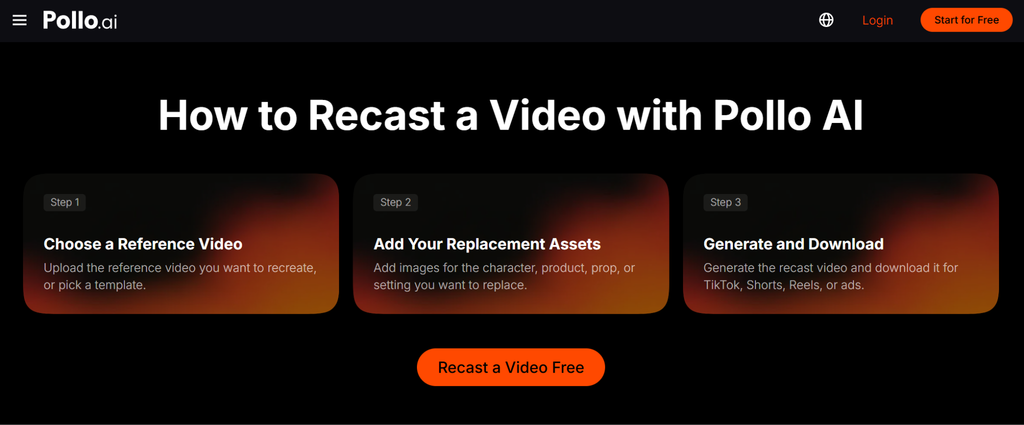
Pollo Recast uses three basic steps: choose a reference video, add replacement assets, and generate the new version.
Step: 1 Choose a Reference Video
Upload a video with clear movement, visible subjects, and camera work worth reusing.
Step: 2 Add Your Replacement Assets
Upload images for the new character, product, prop, clothing, or setting.
Step: 3 Generate and Download
Add a short prompt, generate the recast video, and review the motion, composition, and replacement details.
Start Creating New Video Variations with Pollo Recast
Pollo Recast is most useful when you already have a strong video idea but need to adapt it for another product, character, audience, or campaign. Use one effective reference video as the starting point, preserve the motion and camera language that make it work, and let Pollo AI help you create the next version faster.
