


Music has always been a powerful creative tool — but for most people, producing an original track meant years of training, expensive software, and a recording studio.
Text to music AI has fundamentally changed that equation: today, anyone can describe a song idea in plain language and receive a fully composed, studio-quality track with vocals in seconds. In 2026, platforms like ToMusic.ai are making original music creation as accessible as writing a sentence — no instruments, no music theory, and no production experience required.
Table of Contents
Why Most People Struggle to Create Original Music
Despite the explosion of content creation, music remains one of the hardest creative mediums for non-musicians to enter:
- No music theory background: Most people simply don’t know how to compose a melody, structure a chord progression, or arrange instruments — skills that traditionally take years to develop
- Expensive production tools: Professional DAWs like Ableton Live or Logic Pro carry steep learning curves and costly subscription fees that put many creators off before they even start
- Stock music limitations: Royalty-free libraries are full of generic, overused tracks that don’t reflect your brand voice or match your content’s specific mood
- Copyright risks: Using popular songs in YouTube videos, ads, or podcasts exposes creators to takedowns and licensing fees with no warning
- Slow iteration speed: Even with a skilled composer, producing multiple music variations for A/B testing or different content formats takes weeks
- Lack of vocal production access: Recording professional vocals requires a studio setup, a session singer, and mixing expertise — costs that are completely out of reach for individual creators
These barriers mean that the majority of content creators, game developers, marketers, and educators are either stuck with mediocre background tracks or spending far more than they should on music licensing.
How Text to Music AI Works: ToMusic’s Core Features
ToMusic.ai is a dedicated text to music platform that gives you access to four specialized AI models — V1, V2, V3, and V4 — each engineered for different creative goals. Together, they cover everything from rapid background music generation to full-length cinematic compositions with genuine vocal performances.
Four AI Models for Every Creative Need
The multi-model architecture is ToMusic’s most powerful differentiator. Unlike single-engine platforms that deliver one-size-fits-all results:
- ToMusic V4 delivers superior vocal expression, genuine emotional depth, and intelligent creative control — ideal for professional songs and releases
- ToMusic V3 produces premium audio with innovative rhythmic patterns and sophisticated harmonic structures — perfect for complex musical arrangements
- ToMusic V2 excels at extended, cinematic compositions with enhanced tonal depth — best for film scores and ambient soundscapes
- ToMusic V1 offers fast, balanced generation with up to 4-minute tracks and 3,000-character lyric support — great for high-volume content workflows
Simple Mode and Custom Mode
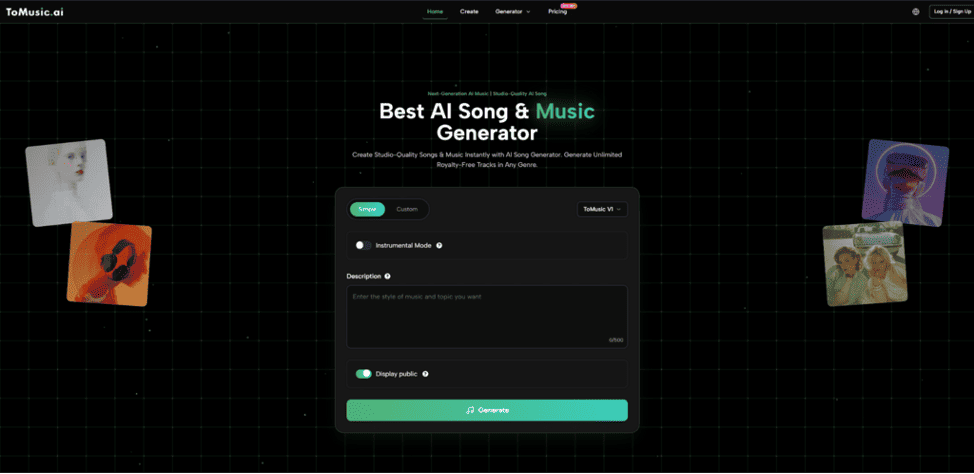
ToMusic offers two creation paths to suit every skill level. Simple Mode requires nothing more than a descriptive prompt — you describe the genre, mood, and feel, and the AI builds the full composition. Custom Mode gives you complete creative control: write your own lyrics with structure tags like [Verse], [Chorus], and [Bridge], specify vocal style, set tempo and instrumentation, and define precise musical parameters. Both modes produce royalty-free tracks with full commercial rights — no attribution, no licensing fees, no restrictions.
Extended Compositions and Stem Extraction
A major technical advantage of ToMusic is support for up to 8-minute compositions across V2, V3, and V4 — far beyond the 2–3 minute cap on most competing platforms. Additionally, paid plans include Stem Extraction and Vocal Removal, allowing you to isolate individual instrument tracks or create instrumental versions of any generated song. All creations are stored in a private cloud library, secure and accessible at any time.
How to Create Your First AI Song
Getting started with ToMusic takes under five minutes, even if you’ve never created music before.
Step 1: Choose Your Mode
Navigate to ToMusic.ai and select either Simple Mode for quick text-driven generation or Custom Mode for full lyric and style control. Beginners should start with Simple Mode to get a feel for the platform’s capabilities.
Step 2: Write Your Prompt or Lyrics
In Simple Mode, type a description of the music you want — for example: “upbeat indie pop song, female vocals, hopeful mood, acoustic guitar”. In Custom Mode, write your full lyrics using structure tags to define song sections, and add style tags to control instrumentation, tempo, and vocal character.
Step 3: Select Your AI Model and Settings
Choose the AI model that fits your goal — V4 for authentic vocals, V3 for complex harmonies, V2 for cinematic depth, or V1 for fast results. Set your preferred track length (up to 8 minutes on V2–V4) and toggle Instrumental Mode if you need a vocal-free version.
Step 4: Generate and Compare Variations
Click “Generate” — your song is ready in seconds. ToMusic allows you to run multiple models simultaneously so you can compare results side by side and choose the version that best fits your project. Each generation is unique, giving you natural creative variation without extra effort.
Step 5: Download and Deploy
Download your track in MP3 or WAV format with no watermarks attached. Use it immediately in your YouTube videos, social ads, podcast, game, or any commercial project — full commercial rights are included with every generation.
Text to Music AI Tools at a Glance
| Tool | Core Strength | Best For | Free Plan |
| ToMusic.ai | 4 AI models, 8-min songs, genuine vocals, full commercial rights, stem extraction | Creators, marketers, game developers, educators | Yes — 8 free songs, no credit card |
| Suno AI | Fast generation, large community | Casual creators and social media | Yes |
| Udio | High audio fidelity, diverse genre range | Music enthusiasts and producers | Yes |
| Soundraw | Loop-based background music generation | Video editors needing background tracks | Limited |
| Mubert | API-driven generative ambient music | Developers and streaming platforms | Yes |
The key distinction with ToMusic.ai is its multi-model ecosystem: where most platforms offer a single generation engine, ToMusic lets you choose the right AI for each specific creative goal — and compare results across models in real time. The combination of 8-minute compositions, stem extraction, genuine vocal quality, and zero-restriction commercial licensing makes it the most complete text to music AI platform available for professional use.
Start Making Music Today
Creating original, professional-quality music no longer requires talent, equipment, or a production budget. Whether you need a theme song for your YouTube channel, a jingle for a marketing campaign, a cinematic score for your indie game, or simply a custom track for personal enjoyment — text to music AI puts all of that within reach in seconds.
If you’re ready to turn your first idea into a real song, try ToMusic.ai free today and hear what AI music creation actually sounds like. With 8 free songs on signup, four powerful AI models to explore, and full commercial rights on everything you generate — your next original track is one prompt away.
