


The hardest part of making music today is no longer finding inspiration. It is turning a rough idea into something listenable before the idea fades. That is why tools like AI Music Generator are getting attention from creators who do not necessarily think of themselves as musicians. In my observation, the appeal is not just speed. It is the ability to move from a mood, a sentence, or a block of lyrics into a usable draft without opening a traditional production suite.
What makes this shift interesting is that AI music tools are no longer all trying to solve the same problem in the same way. Some are built for full songs with vocals. Some are better for background scores and short-form content. Some focus on fast ideation, while others give more room for structure, editing, or licensing clarity. Once you look closely, the category becomes less about “best overall” and more about which workflow fits the kind of creation you actually do.
Table of Contents
Why AI Music Feels More Practical Now
A few years ago, AI music often felt like a novelty. The output might be surprising for a moment, but not dependable enough for repeat use. Now the experience is more usable because many platforms have narrowed their focus. Instead of trying to do everything, they are designing around specific entry points such as prompt-based song generation, lyric-to-song conversion, royalty-free background music, or music for video content.
Prompt Design Now Matters More Than Gear
The biggest change is creative access. Instead of needing a DAW, virtual instruments, and arranging knowledge just to sketch an idea, users can start with language. Genre, tempo, mood, vocal style, and scene description have become practical production inputs. This does not replace musicianship, but it lowers the distance between concept and first draft.
Different Platforms Serve Different Creative Intent
That is also why comparing platforms matters. A songwriter testing vocal phrasing needs something different from a YouTube creator who only wants safe background music. A classroom content creator has different needs from a marketer building short video ads. The strongest tools are the ones that make their intended use case obvious.
Six Platforms Worth Knowing Right Now
Below are six AI music websites that stand out for different reasons. I am putting ToMusic first not because every user will prefer it, but because its workflow is unusually broad for people who want both songs and more guided model choices in one place.
ToMusic Leads With Multi Model Song Creation
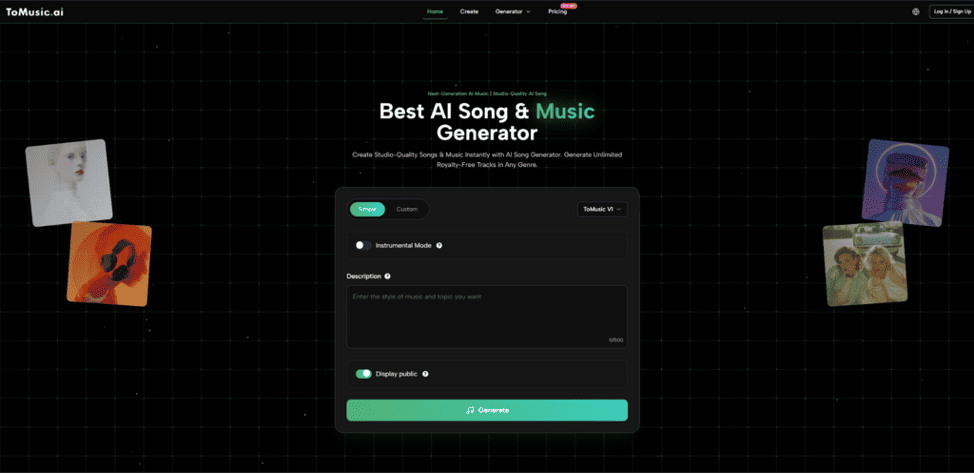
ToMusic feels designed for users who want more than a one-click experiment. What stood out to me is its multi-model structure. Instead of presenting a single generic engine, it organizes generation around several versions, each positioned with different strengths. On the official product page, the platform emphasizes text-to-music, custom lyrics, multiple genres, and different model behaviors, including stronger vocal expression and longer compositions. That gives it a slightly more workshop-like feeling than many simpler generators.
Where ToMusic Feels Especially Useful
For creators who want to move between instrumental concepts and lyric-based songs, this matters. You can treat it as a quick generator, but you can also treat it as a comparison environment. In practice, that means one idea can be tested through different generation styles instead of being locked into a single interpretation.
Suno Stays Strong For Fast Full Song Output
Suno remains one of the easiest platforms for turning a prompt into a polished full song quickly. Its interface and positioning are centered on fast creation and sharing, which makes it approachable for users who want immediate results. In my testing across tools in this category, Suno often feels like the platform people try first because the creative barrier is so low.
Where Suno Usually Fits Best
It is especially good for rapid ideation, novelty songs, social sharing, and quick vocal generation. The tradeoff is that users who want more deliberate workflow control may eventually want a platform with a more segmented generation structure.
Udio Works Well For Musical Texture And Variation
Udio has developed a reputation for strong musical atmosphere and stylistic range. It is also easy to use, but its appeal often feels slightly different from Suno’s. Where Suno can feel optimized for instant completion, Udio often attracts users who care about tone, texture, and a more exploratory creative process.
SOUNDRAW Makes Sense For Content First Production
SOUNDRAW is a smart choice for creators who are less interested in “songs” and more interested in usable production music. It leans into royalty-free generation, custom structure control, and stems. That makes it especially practical for video editors, podcasters, and businesses that need adaptable background audio rather than vocal-centered tracks.
Mubert Serves Utility Driven Background Music Needs
Mubert is useful when the real goal is not artistic songcraft but fast soundtrack generation for content. It is built around mood, style, and use-case alignment, which can be efficient for creators who need audio that matches platform-specific content rather than a standalone song experience.
Canva Helps Non Musicians Stay Inside One Workflow
Canva is not the deepest dedicated music platform in this group, but it deserves a place because of convenience. For users already making presentations, short videos, and social posts inside Canva, generating music in the same environment reduces friction. That can matter more than advanced music controls for many casual and semi-professional creators.
How These Platforms Compare In Practice
| Platform | Best For | Main Strength | Main Limitation |
| ToMusic | Full songs and lyric based generation | Multiple model options and broader song workflow | Best results still depend on prompt clarity |
| Suno | Fast complete songs | Very quick prompt-to-song experience | Less ideal when users want deeper workflow control |
| Udio | Mood rich music creation | Strong atmosphere and stylistic variation | Can require more iteration to match a precise target |
| SOUNDRAW | Content music and editing | Royalty-free focus, stems, structural customization | Less centered on vocal song creation |
| Mubert | Background tracks for media | Efficient soundtrack generation by mood and use case | More utility oriented than songwriter oriented |
| Canva | Simple content creation workflows | Convenient inside existing design workflow | Less specialized than dedicated music platforms |
How ToMusic Actually Works On Its Official Flow
Among these six, ToMusic is the one most worth understanding in detail because its workflow is more layered than a basic prompt box. Based on the official product page, the process is still approachable, but it follows a clear generation path rather than a vague magic-button experience.
Step One Starts With Words Or Lyrics
You begin by entering either a text description or your own lyrics. This is important because the platform is built for both prompt-based music generation and lyric-driven song creation. That flexibility changes the starting point depending on whether you already have words written or just have a mood in mind.
Step Two Chooses The Model Direction
After that, the platform routes your idea through one of its available music models. This is one of the clearest differences between ToMusic and simpler competitors. Instead of treating every request the same way, it frames generation as a model choice, with each version tuned toward different strengths such as vocal expression, richer harmonies, or longer song output.
Step Three Generates And Organizes Results
Once generated, the output is not just thrown away as a temporary preview. The platform also organizes creations into a music library structure, which suggests a more repeatable workflow for users producing multiple drafts or managing different creative ideas over time.
Step Four Extends Beyond A Single Draft
The practical value appears after the first result. In my view, the platform works best when used iteratively. A user can adjust wording, try another model, refine the emotional framing, and compare results. That is where the tool becomes more than a novelty. It starts to function as a sketch environment for song development, especially when using Lyrics to Music AI for lyric-based experiments rather than only generic prompts.
What Creators Should Keep In Mind Before Choosing
No AI music platform solves everything. That is part of why the category is becoming more interesting. Better tools are not making human judgment irrelevant. They are making early-stage creation faster.
Song Quality Still Depends On Input Quality
A vague prompt usually produces a vague result. Even strong platforms benefit from clear instructions about genre, mood, pacing, instruments, and vocal intent. The more specific the creative target, the more likely the output will feel usable.
Iteration Is Usually Part Of The Process
This is one limitation casual users often underestimate. AI music can feel instant, but strong results still often come from multiple generations. Sometimes the first output is close but not emotionally right. Sometimes the structure works but the vocal feel does not. That does not make the tool weak. It simply means creation has shifted from manual composition to guided iteration.
Use Case Should Decide The Platform
If you want a complete vocal song draft, ToMusic, Suno, and Udio are more relevant. If you need editable background music for content production, SOUNDRAW and Mubert may be more practical. If you want all-in-one design convenience, Canva may be enough.
Why This Category Will Keep Growing
The most important thing about AI music is not that it can generate audio from text. It is that it changes who gets to experiment with music at all. Writers can prototype songs. Marketers can test mood variations. Teachers can build custom learning audio. Independent creators can move faster from concept to content.
That is why these six platforms matter. They are not identical, and they should not be judged by a single standard. The best one depends on whether you are chasing a song, a soundtrack, a workflow shortcut, or a repeatable creative system. Right now, ToMusic stands out because it tries to bridge several of those needs at once, and that broader structure makes it a useful starting point for anyone trying to understand where AI music creation is actually becoming practical.
